Virtual Analog Synthesizer
VR has an inbuild Virtual-Analog Synthesizer for ‘Subtractive Synthesis’ where you can modify existing ‘synthesizable patches’ or create your own synthesizer sound ‘from scratch’
The VA synth cannot be accessed through VR Interface but only via ‘editors’, available for IOS and Windows/Mac/Linux, which are presented in this document
|
The VA-synth of VR is identical to the one in Jupiter 80 (and more/less Integra-7)
It’s a ‘3 oscillator’ synthesizer (Roland calls oscillators ‘partials’) and is the ‘forerunner’ of actual Roland Zenology |
While the synth is very powerfull it suffers from a massive limitation of VR: VR has no ‘free user slots’ for saving new sounds: every new sound is saved overwriting an existing patch. As VR patches are ‘global’, the patch will change in any of its occurences in VR registrations
The workaround is to overwrite ‘useless’ VR patches, like the patches from category ‘SFX’ – this gives at least 11 ‘free user slots’
Another possibilty is to use V-Combo Editor ‘live’: the editor has its own ‘user slots’ for saving VA sounds which then can be loaded into VR in realtime via EDITOR Midi-Mapper
Roland IOS Editor (app)
Download from Roland Website and install on a iPad
Connect ipad to VR by lightning-cable (old ipads), USB-C cable (new ipads) or WLAN (Roland/Netgear Wlan Dongle WNA 1100)
in the Ipad app, switch to the synthesizer UI, load a ‘VR-patch’, edit it, and save it back.
The IOS app only allows to save the new sound back to the original patch, overwriting it – the factory patch will be lost
If you want to use ‘useless’ patches for saving/overwriting, like the SFX patches, load the sound you want to modify into the app, take screenshots (or photos) of all synth-settings, then load a ‘useless’ patch into the app and adjust all settings from the photos, then modify the sound, then save

V-Combo EDITOR for Windows/Mac/Linux
Download from Roland VR09 / VR730 V-Combo EDITOR v1.12.25 and install on your Windows/Mac/(Linux) PC:
The VA-synth of EDITOR has a number of advantages over the IOS app:
– you can save a new sound to any other VR patch (e.g. to ‘useless’ patches
– it gives access to more parameters compared to IOS app (e.g. famous ‘analog feel’, essential to create warm analog sounds)
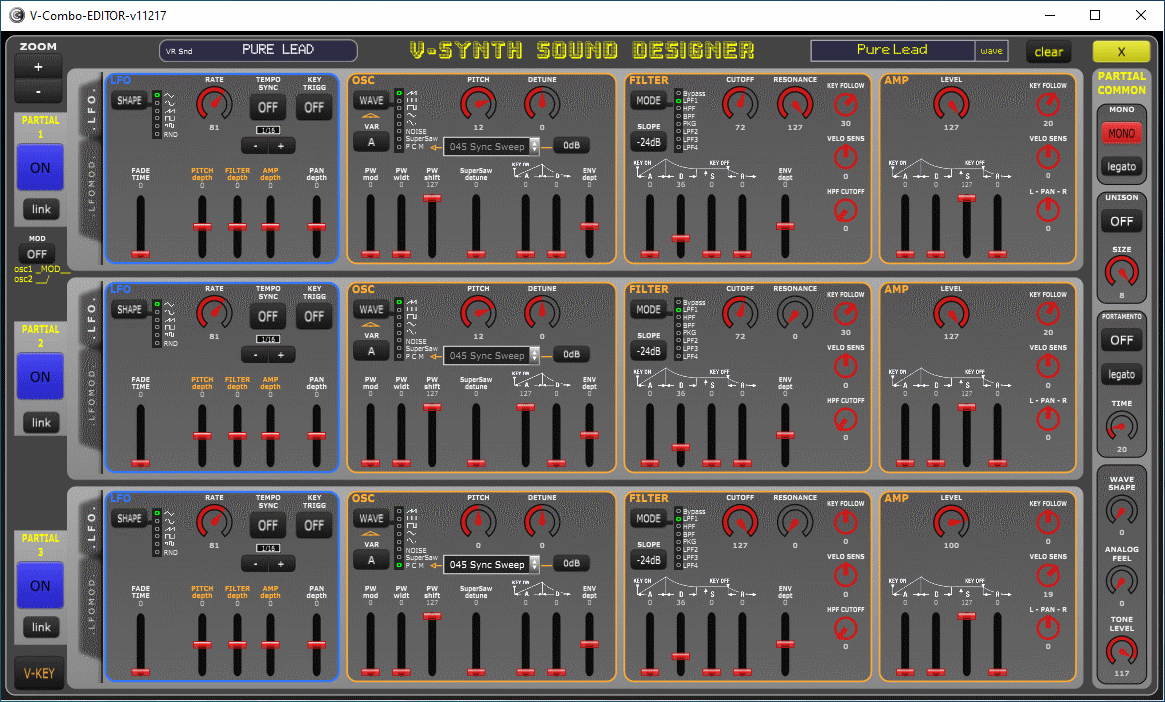
– it has an ‘alternative GUI’ (see picture), derived from ‘Gaia Sound Dessigner’ with all partials on one page
– it has ca 1000 ‘user slots’ to save new sounds. These can be used as ‘storage’ for your ‘experiments’
or can be used to load the sounds into VR ‘live on stage’ in realtime using EDITOR ‘Midi Mapper’
– it gives access to Roland ‘Synth Legend Tones’ (SLT): 120 ‘hidden VR sounds’ replicating Roland synths sounds from JP8, Junos, SH etc
EDITOR ‘Sound Designer’: all ‘oscillators’ on one page allows ‘parallel working’ without switching between ‘oscillator tabs’: